Guests can save a card for the night when they buy a ticket, on their own page, or at the door with a volunteer's help. After the event, a manager charges their pledges to it and they get a receipt. Your team only ever sees the card's brand and last four digits.
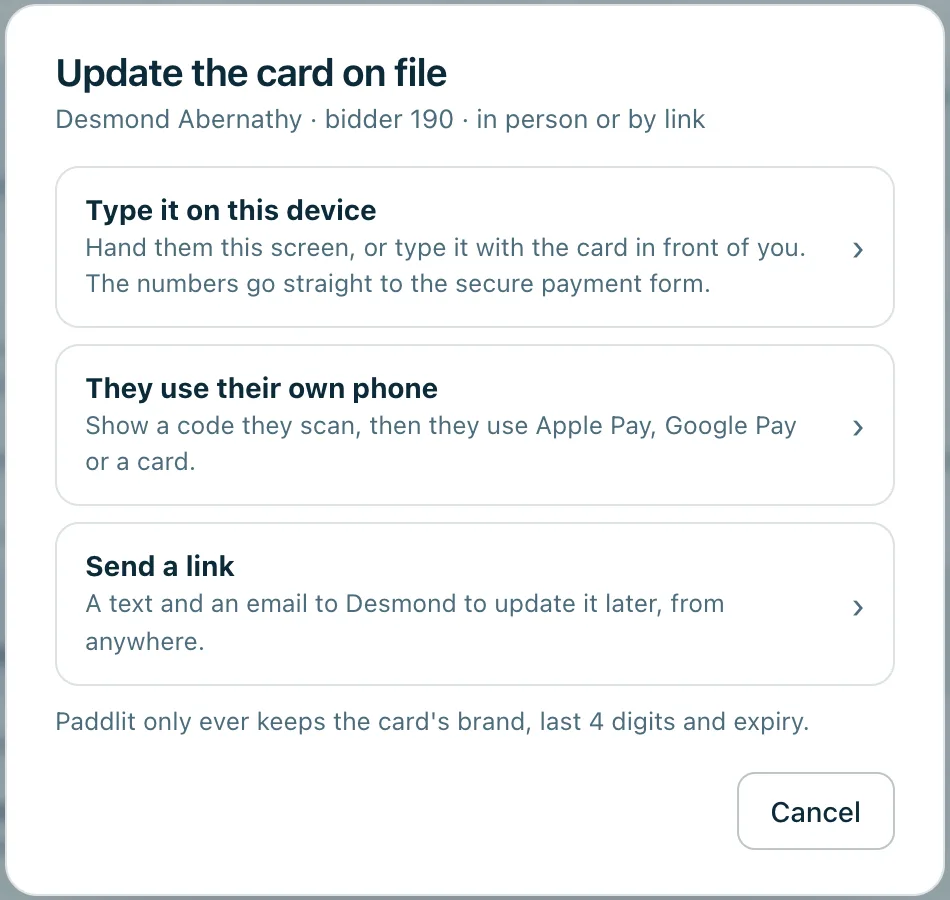
Update the card on file: type it on this device, they use their own phone, or send a link.
Real screenshots of Paddlit, taken with a made-up organisation, Maple & Main Children's Fund.
Three ways to save a card
At checkout. "Save my card for the night" is already ticked when someone buys a ticket.
On their own page. Each guest has a page where they can add a card with Apple Pay, Google Pay or a card number, see their pledges and payments, and change or remove the card any time.
At the door. Volunteers see the card on the guest's bidder card ("Visa •••• 4242", when it expires and how it was added) and can update it with them in person.
Saving a card records what the guest agreed to: that pledges they make at this event are charged to it after the event, with a receipt, and that they can change or remove it any time.
Sorting it out at the door
From a guest's bidder card, a door volunteer, manager or owner presses Update card and chooses:
Type it on this device. The card number goes into a secure field on the volunteer's phone, tablet or laptop, after they tick that the guest agrees. The number never reaches Paddlit or stays on the device, and the card is noted as typed in by that volunteer.
They use their own phone. The guest scans a code, adds their card on their own phone, and the volunteer's screen closes by itself once it's saved.
Send a link. An email, or a text where they've agreed to texts, so they can do it later.
A card can be removed, and the removal undone.
Who sees what
Door volunteers, managers and owners see the card's brand, last four digits and expiry, and can update it. Collectors only see that a card is on file. Managers and owners also see how much the guest has pledged tonight, to be charged once a manager collects.
Paddlit keeps the brand, last four digits, expiry, how and by whom the card was added, and what the guest agreed to. The card itself is held by the payment processor, on your organisation's own account.
Good to know
A card on file is for one event. A new card replaces the old one everywhere it was used.
In practice
How it plays out
A guest with no card saved
At the door, the volunteer opens the guest's bidder card and sees there's no card on file.
They choose "They use their own phone". The guest scans the code and adds their card with Apple Pay.
The volunteer's screen closes by itself, showing the new card saved.
A guest hands over a card
A guest would rather the volunteer did it.
The volunteer types the card into the secure field, ticks that the guest agrees, and saves.
The card is on file, noted as typed in by that volunteer, and the number was never kept on the device.
See your next fundraising night on Paddlit
Sign-ups open soon. Book a demo and we'll show you around.