Sell sponsorship packages on your event page, next to your tickets. When a sponsor pays, Paddlit does what the package promises: a reserved table, bidder numbers held for their guests, their name on your event page and their logo on the big screen.
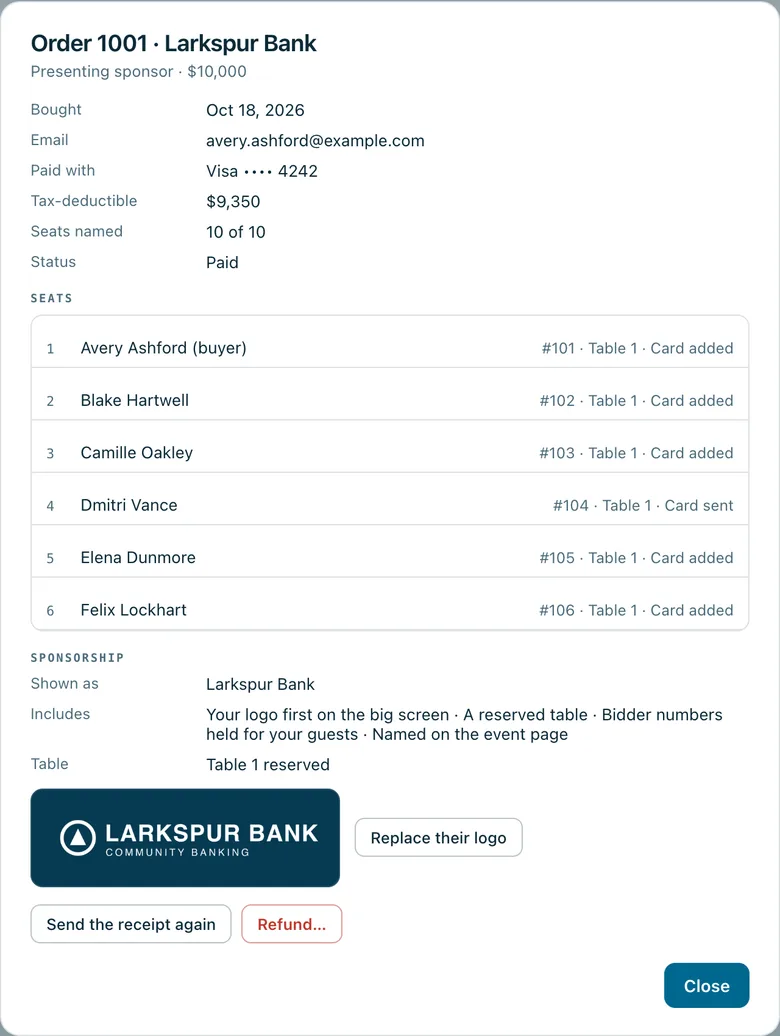
A presenting sponsor's order: the bank's ten named seats with their bidder numbers at table 1, what the package includes, the reserved table and the logo they sent.
Real screenshots of Paddlit, taken with a made-up organisation, Maple & Main Children's Fund.
What a package can include
Each package has a price, the value of what the sponsor gets, how many seats come with it and how many you're selling. Then you tick what it includes:
Their logo first on the big screen, or their logo on the big screen with the other partners.
A reserved table.
Bidder numbers held for their guests.
Their name on your event page.
What happens when a sponsor pays
Sponsors buy on your event page, like a ticket, and can give the name they'd like shown, such as their company's. Then, for what their package includes:
A table: the lowest-numbered table nobody is sitting at is reserved for them, and their guests are seated there. If none is free, your team is told to give them one on the guest list.
Bidder numbers: one number is held for each seat, marked with the sponsor's name, and their guests get those numbers as they're named.
Their name: your event page thanks them ("With thanks to our sponsors: …"), and a sold-out package says it's taken, with thanks.
Their logo: their confirmation email asks them to send it from their order page, and it goes up on the big screen.
Logos on the big screen
Sponsors upload their logo from their order page, and your team can upload it for them or replace it. PNG, SVG, JPEG and WebP files up to 5 MB are accepted, and each is checked the way your own logo is: one that's too small is turned away with a plain reason, such as asking for one at least 600 pixels wide.
Logos with see-through backgrounds are adjusted so they read on the dark screen. A "logo first" sponsor appears first, with the presenting sponsors; other logos join the partners' row. Sending a new file replaces the old one.
What your team sees
Each sponsor's order shows the name they're shown as, what's included, the table reserved, the numbers held, and their logo, or that you're still waiting for it.
If a sponsor cancels and the order is refunded, it's all undone: the table and numbers are released, the logo leaves the big screen and the package goes back on sale.
In practice
How it plays out
A presenting sponsor signs up
For example, a gala offers one Presenting sponsor package: $10,000, ten seats, with every option ticked.
A local bank buys it and names one guest at checkout. They're given table 1, and bidder numbers are held for the rest of their seats.
The event page now thanks the bank by name, and the package shows as taken.
Their first logo upload is too small and is turned away with the reason. The next one goes straight onto the big screen, first in line.
As the bank names its other guests, each gets one of the held numbers and a seat at table 1.
See your next fundraising night on Paddlit
Sign-ups open soon. Book a demo and we'll show you around.