Sell tickets, tables and sponsorships from your own event page
Your event gets its own page, in your colours. People buy single tickets or whole tables and pay with Apple Pay, Google Pay or a card. Every seat they name becomes a guest on your list with their own bidder card, and the money goes to your organisation's own account, never through Paddlit.
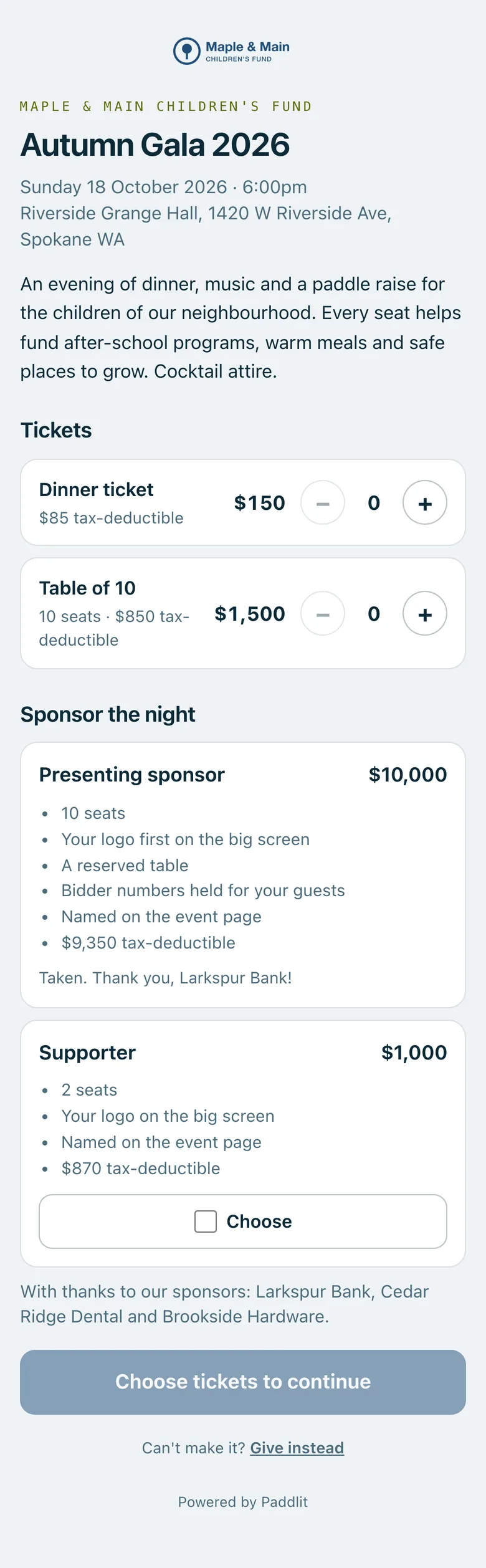
An organisation's event page on a phone: the Autumn Gala's date and venue, dinner tickets and a table of 10 with their tax-deductible amounts, and two sponsorship packages.
Real screenshots of Paddlit, taken with a made-up organisation, Maple & Main Children's Fund.
Your event's own page
Each event gets its own page, at an address made from its name (Spring Gala 2027 becomes …/spring-gala-2027). It shows your organisation's name, the event's date, time and venue, and a few words about the night that you write, up to 1,200 characters.
Each ticket has its own + and − buttons, up to 10 of each in one order.
When 10 or fewer are left, the page says how many. When they're gone, it says Sold out.
For nonprofits whose status is confirmed in Paddlit, each ticket shows how much of its price is tax-deductible.
Sponsorship packages are listed under Sponsor the night, each with what it includes.
When your donation page is open, the page also says: Can't make it? Give instead.
While tickets are on sale, the page carries the event's details in the form search engines read. Once the day is over, it asks search engines to take it out of their results.
Setting up what you sell
Managers and owners set up the event's tickets on its Tickets & sponsors screen. Each ticket has:
A name and a price, from $1.
The value of what they get, such as dinner, so receipts can show the tax-deductible part.
Seats included. A single ticket is one seat. A table is the same thing with more seats, such as a Table of 10.
How many to sell.
Every change can be undone straight after. You can't sell fewer than have already been bought, and anything someone has started buying comes off sale rather than disappearing.
Selling switches on once your organisation can take card payments, the event is open and at least one ticket is on sale. Switch it off and the page stays up, saying tickets aren't on sale yet.
Checkout
Who's coming? The buyer is the first seat. They can name the others now, with an email address if they have it, leave some to name later, or tick "I'll send my guests a link to add their own details".
Cover the card fee. A box that adds the card fee so the full amount reaches you. You choose whether it's already ticked, not ticked, or not offered.
Save my card for the night. Already ticked, so pledges the buyer makes on the night can be charged to that card after the event, with a receipt.
Apple Pay, Google Pay or a card. Card details go straight to a certified payment processor, never to Paddlit.
Places are held for 30 minutes while someone pays. If a card is turned down, they can try again on the same page without making a second order.
After they pay
The buyer gets a confirmation email with a button to add their bidder card, and a separate numbered receipt. For nonprofits whose status is confirmed in Paddlit, the receipt shows the tax-deductible amount and the value of what they got, the way the IRS asks.
Their order has its own page, which shows:
Their own bidder card, ready for Apple Wallet or Google Wallet.
Their guests, each with a bidder number, table and whether they've added their card.
A place to add the rest of their guests.
The link their guests can use to add their own details.
Each guest who's named with an email address gets their own email with a link to their bidder card.
What your team sees
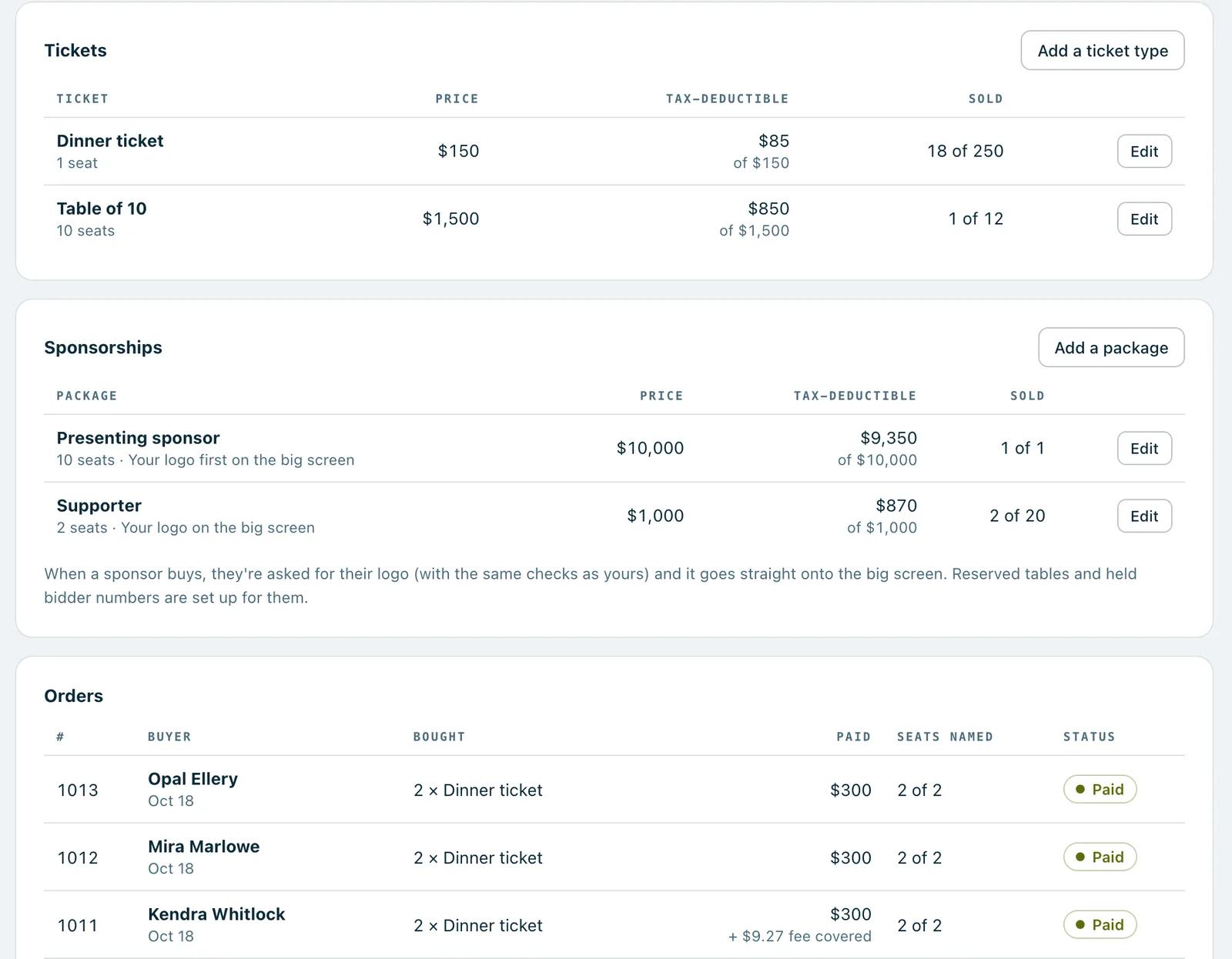
The Tickets & sponsors screen shows:
How much has sold, and how many seats against the number you expect.
How many sponsors have signed up, and how many packages are still open.
How many seats are still waiting for a name, with a button to remind the buyers by email.
Each ticket, with how many have sold out of how many.
Every order, with how many of its seats are named.
Open an order to see each seat's bidder number, table and card, send the receipt again, or remind the buyer to name the rest.
Refunds
A manager or owner can refund a whole order, straight back to the card it was paid with. The seats are cancelled, the guests it added come off the list, their pledges are cancelled and their bidder cards stop working. The buyer gets an email saying so, and the places go back on sale. A refund can't be undone.
The Tickets & sponsors screen: each ticket and sponsorship package with its price, tax-deductible amount and how many have sold, and the orders as they come in.
In practice
How it plays out
A table captain fills a table of ten
For example, a gala sells a Table of 10 for $1,500, with dinner valued at $650.
A table captain buys one, ticks "I'll send my guests a link to add their own details", and pays with Apple Pay. They're seat one, with their own bidder card.
From their order page they copy the guests' link and send it to the other nine.
Each guest opens the link, types their name (an email is optional) and lands on their own bidder card.
Your team sees "Seats named 3 of 10" on the order, and presses Remind the buyers to nudge the captain about the rest.
A couple buys two dinner tickets
For example, Alice buys two $150 dinner tickets, each with dinner valued at $65, and names her partner Bob with his email address.
She leaves "Cover the card fee" ticked, which adds $9.27, and leaves "Save my card for the night" ticked.
Both of them join the guest list with bidder numbers, and Bob gets his own email with his card.
For a nonprofit whose status is confirmed in Paddlit, Alice's receipt says $179.27 is tax-deductible: what she paid, less the $130 of dinner, plus the fee she covered.
On the night, any pledge Alice makes can be charged to the card she saved.
The last places go
One ticket has two places left, and the page says so.
Someone asks for three and is told only two are left.
Once they're bought, the next person sees Sold out.
See your next fundraising night on Paddlit
Sign-ups open soon. Book a demo and we'll show you around.