Every event has eight report pages, each one a click away from the event and from each other: an Overview to hand to the board, then the money, the paddle raise, tickets and sponsors, giving, guests, donors, and messages and your team. Each page has its own address and its own spreadsheet.
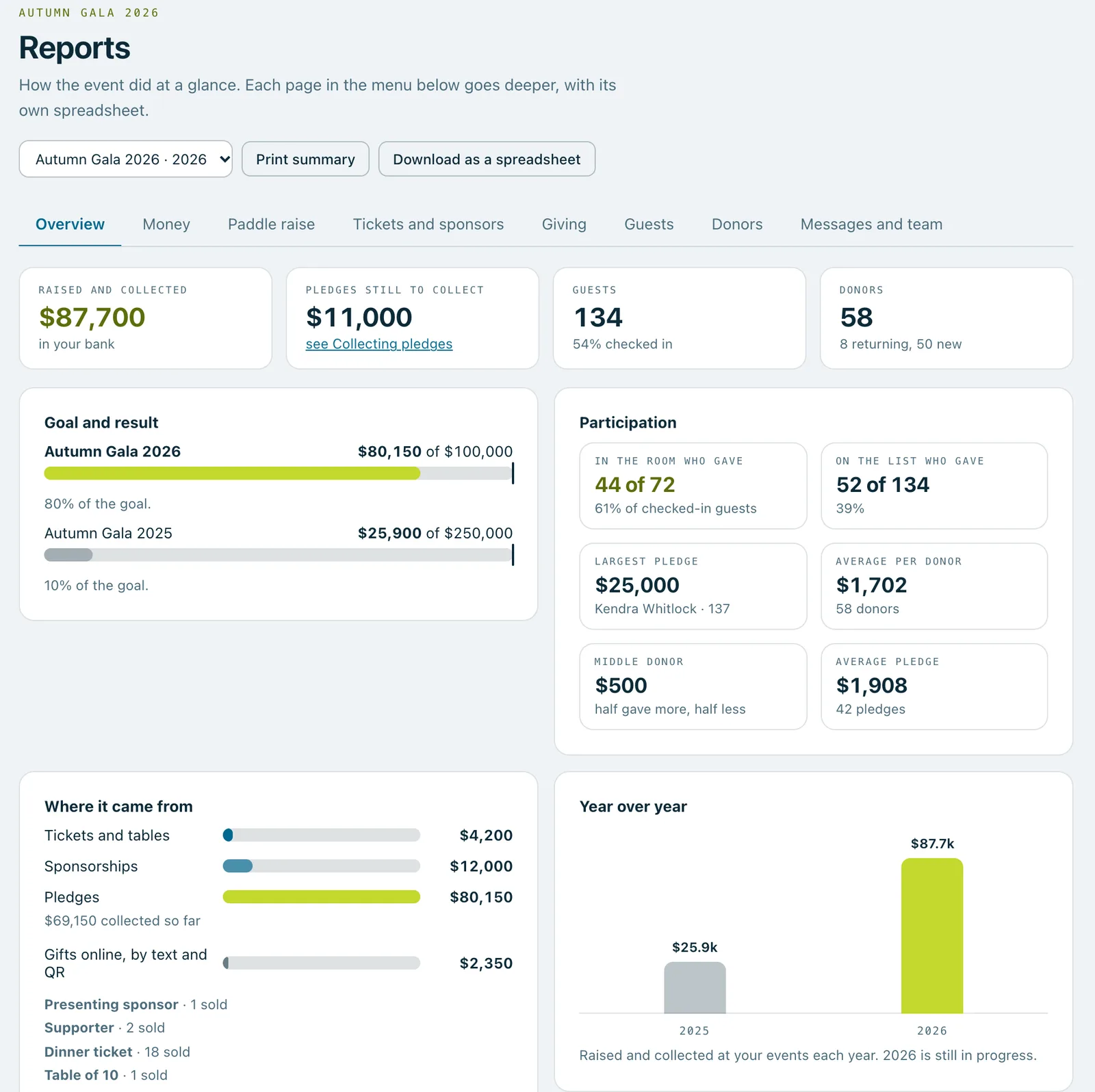
An event's report, the Overview: raised and collected, still to collect, guests, donors, the goal and how it went, participation, where the money came from and year over year, with the menu of report pages above.
Real screenshots of Paddlit, taken with a made-up organisation, Maple & Main Children's Fund.
Where to find them
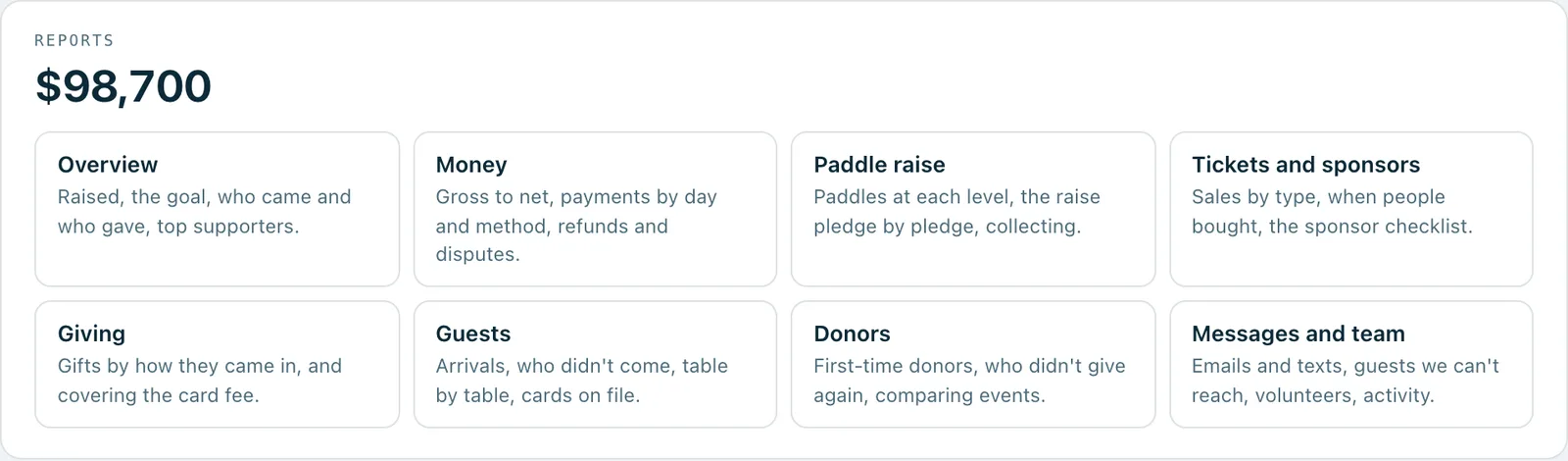
When you open an event, the Reports card lists every report page with a line about what's on it. Each page has the same menu at the top, so you can go from one to the next. Managers of the event and owners can open them; door volunteers and pledge collectors can't.
On plans with donor history, owners can switch between events and stay on the same page, so last year's paddle raise is one click from this year's.
Overview
Raised and collected, pledges still to collect, guests and the share who checked in, and donors, new and returning.
The pledge goal from Event settings next to what was pledged, and which pledge passed it. On plans with donor history, your previous event against its own goal.
Participation: how many guests in the room gave something, and how many on the list did, the largest pledge, and the average and middle amount per donor.
Where the money came from: tickets and tables, sponsorships, pledges (and how much of them is collected), gifts, and your top five supporters.
Year over year across your events, on plans with donor history.
Print summary prints the Overview on its own, without the menus and buttons, ready for a board meeting.
Money
Gross to net for each source, tickets and sponsorships included: what came in before refunds and disputes, and what you keep after them.
Every payment, day by day, split by card, cheque, cash, bank transfer and another way, with its receipt number.
The tax-deductible summary, worked out the way your receipts do it. It shows only when your receipts show a tax-deductible amount.
Each refund, with who asked for it, why and where it stands, and each dispute from a donor's bank, with the date to respond by.
Paddle raise
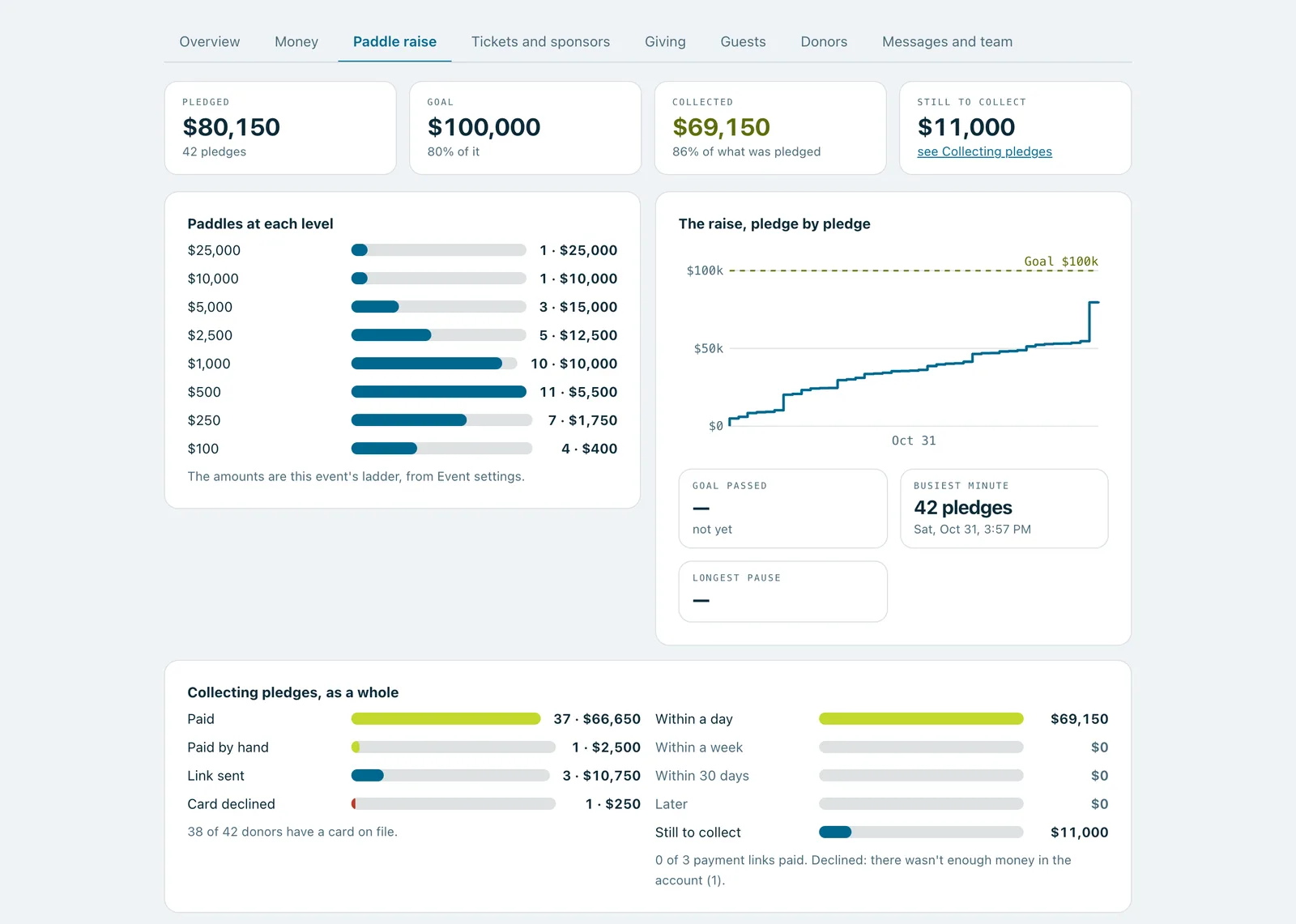
How many paddles went up at each amount on your ladder, with amounts off the ladder under Other. Useful for setting next year's ladder.
The running total against your goal, minute by minute, with when the goal was passed, the busiest minute and the longest pause.
Collecting the pledges as a whole: how many are paid, paid by hand, waiting on a payment link, declined or not charged yet, and how much came in within a day, a week and 30 days.
Every pledge that was changed, removed or put back, with who did it and when, Undo included.
Tickets and sponsors
Each ticket type and package: sold, given free, refunded, still left, and what it brought in.
Tickets sold week by week up to the event, with the weeks messages went to guests marked.
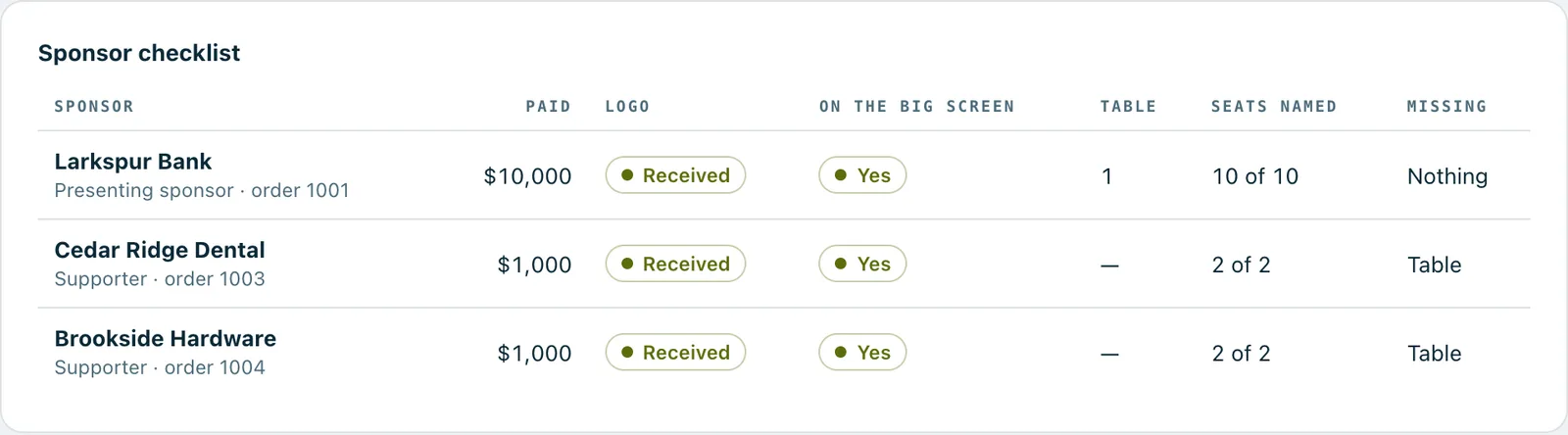
The sponsor checklist: each sponsor's package and payment, whether their logo came in and is on the big screen, their table, the bidder numbers held for them and how many seats have names. Anything missing is listed, so it's sorted before the night.
Buyers who haven't named every seat, with when they were last reminded.
Giving
Gifts by how they came in: the QR code on the big screen, a QR code on a table card, a text, the donation page or the event page, with the number, total and average of each, and how much came in before, on and after the night. And how many people chose to cover the card fee.
Guests
Arrivals every 15 minutes, who checked guests in, walk-ups, wallet passes and stickers printed.
Who didn't come, with anything they pledged, bought or sponsored, for a follow-up call.
Table by table: guests, check-ins, donors and pledges, with the sponsor of each table. Groups and households have their own totals.
Cards on file: how many guests saved one, when and how, and how much of their pledges was collected compared with guests who didn't.
Donors
Everyone who gave to you for the first time at this event, with whether you have their email and mobile number, ready for a welcome note.
On plans with donor history, owners also see who gave at your previous event and not at this one (and whether they were invited and came), who gave more or less than last time, and any two events side by side.
Messages and team
Each kind of email and text the event sent, when it first went, and how many were delivered, opened, clicked or bounced, where Paddlit hears back.
Guests you can't reach: no email, no mobile number, an email that bounced, a landline, or a reply of STOP.
Each volunteer: their roles, whether they've signed in, and the pledges they recorded, guests they checked in and cards they added.
Everything done on the event, newest first, by whom, and whether it was undone. Pick a person or a kind of change to narrow it down.
Spreadsheets for your accounts
On plans with donor history, every report page has its own spreadsheet with that page's tables. The Overview's has every pledge (voided and changed ones too), every payment, every order and every gift, with the date and time, who, their bidder number, what, the amount, any card fee they covered, what was refunded, the tax-deductible amount, how they paid, the receipt number and the status. Anonymous gifts have no name or email.
On every plan, managers and owners can download the event's pledges, and owners can download everything your organisation has in one file.
The Reports menu on an event: Overview, Money, Paddle raise, Tickets and sponsors, Giving, Guests, Donors, and Messages and team.The Paddle raise report: paddles at each amount on the ladder, the running total against the goal, and collecting the pledges as a whole.The sponsor checklist: each sponsor's package and payment, logo, place on the big screen, table, seats named and what's still missing.
In practice
How it plays out
The board meeting after the gala (an example)
The treasurer, an owner, opens the gala's Overview and presses Print summary for the board.
On Paddle raise they see the goal was passed halfway through, and that nobody went for the top amount on the ladder, so next year's starts lower.
On Donors they copy the first-time donors for welcome calls, and see who gave last year and didn't this time.
They download the Money spreadsheet for the accountant.
See your next fundraising night on Paddlit
Sign-ups open soon. Book a demo and we'll show you around.