One event over several days, with sub-events inside it
Some fundraisers last more than one evening: a welcome dinner on Thursday, the gala on Friday, golf and yoga on Saturday morning. Give your event a schedule of days and sub-events, and each guest is on the ones they're coming to. It's still one event, with one guest list, one bidder number for each guest and one total on the big screen.
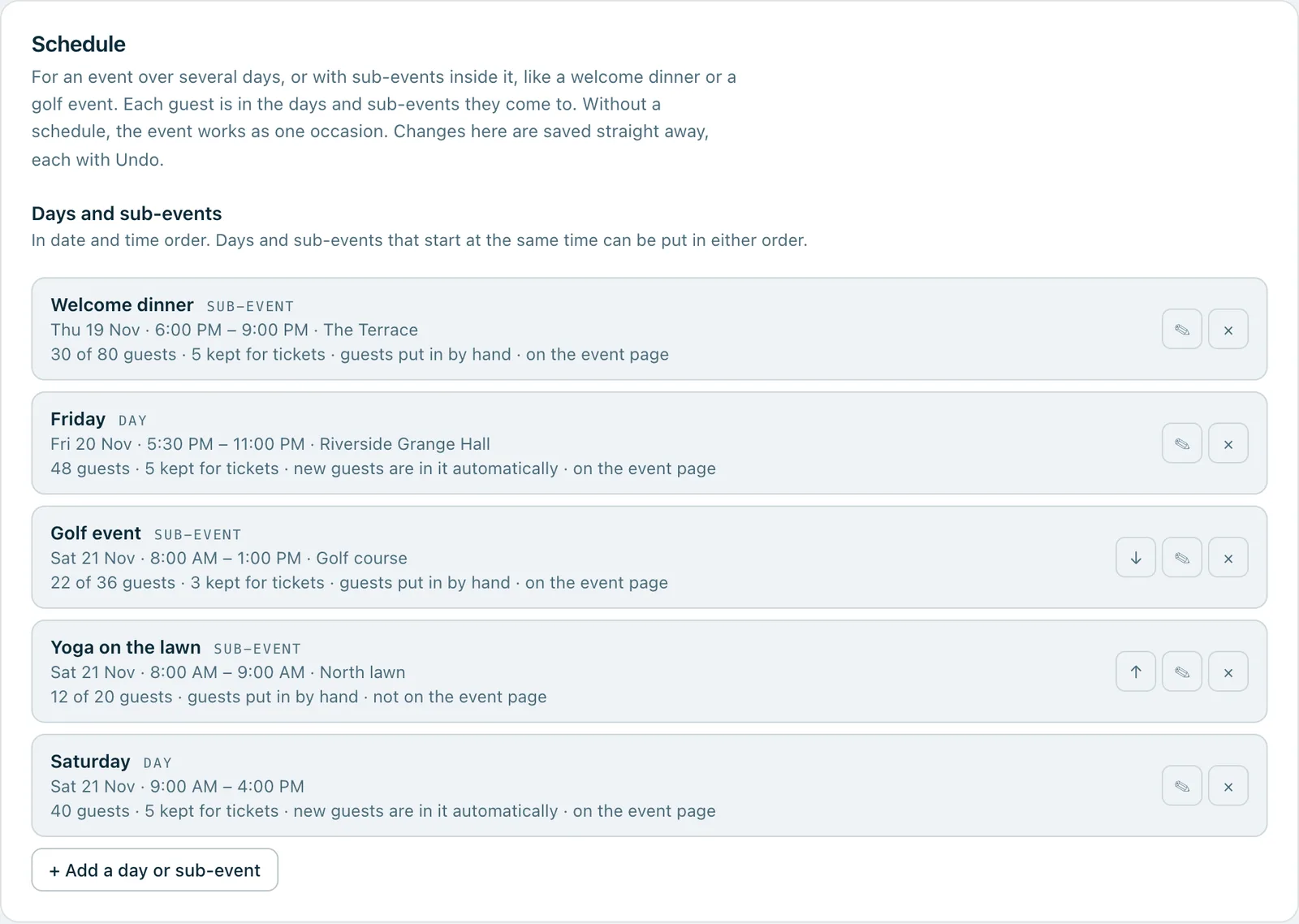
Event settings › Schedule for a weekend: a welcome dinner on Thursday, Friday, a golf event and yoga on the lawn on Saturday morning, and Saturday, each with its time and place, how many guests are in it, whether new guests go in automatically and whether it's on the event page.
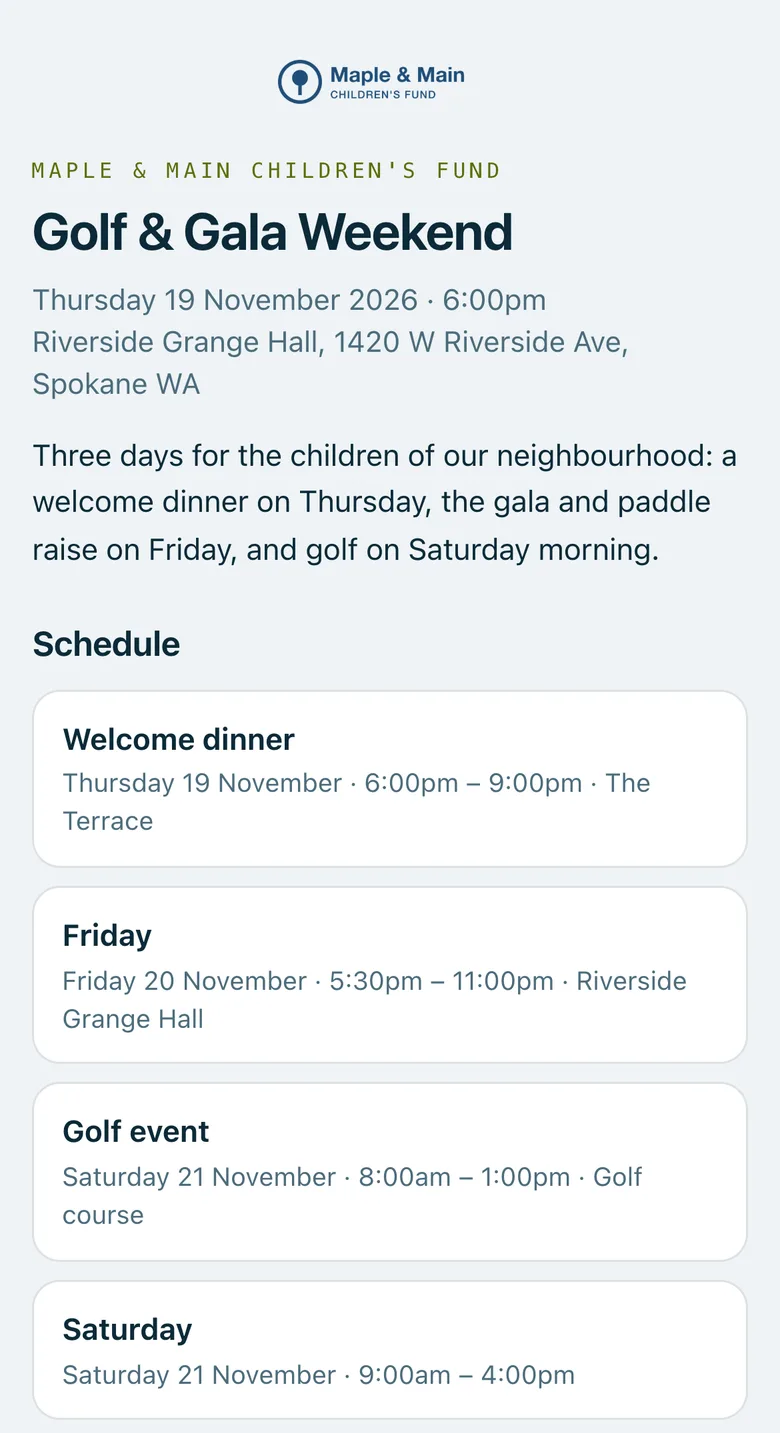
Real screenshots of Paddlit, taken with a made-up organisation, Maple & Main Children's Fund.
Setting up the schedule
Managers and owners add the days and sub-events in the event's settings, under Schedule. Each change is saved as it's made, with Undo straight after.
A day or a sub-event. A day is a whole day of the event, like Friday. A sub-event is something within it, like a welcome dinner or a golf event, on any day.
When and where. A date and a start time, and an end time and a place if you want them. Times are in the event's own time zone.
A guest limit, if it has one. Leave it empty for no limit.
New guests are in this automatically. On for a day and off for a sub-event to start with; you can change either.
Show on the event page. Also on for a day and off for a sub-event to start with. Leave it off for something by invitation, or at a private address: the guests in it still see it on their own page.
The schedule is kept in date and time order, and ones that start at the same time can be put in either order. An event's schedule holds up to 60 days and sub-events.
Who's in what
Automatic ones fill themselves. Every guest added to the event goes into the days and sub-events marked automatic, however they're added: by hand, from a spreadsheet, as a walk-up at the door or with a ticket from your event page (unless the ticket says which days and sub-events it includes).
Made automatic later, it takes the guests already there. Before you save, Paddlit says how many current guests it adds, up to its limit. Turning automatic off takes nobody out.
By hand. Managers and owners put a guest in or take them out from the Attending section of their guest card, or the Schedule button on the guest list.
Limits that hold
Give the golf event 36 places and it stops at 36. Nobody can be put in a full one: Paddlit says it's full, with how many are in it, and that the limit can be raised in Schedule. Each check is made with that day or sub-event locked, so two people adding guests at the same moment can't both take the last place.
A guest added while one of the automatic days is full is left out of that one, and the rest of their add goes through. A limit can't be set below the guests already in it.
Places promised by tickets and packages that aren't named yet count against the limit too, and the schedule shows them as “kept for tickets”.
Where it shows
The guest list. A row of filters with a count for each day and sub-event, and each guest's days and sub-events under their name.
The guest card. An Attending section with a chip for each one.
The guest's own page. “Your schedule”: only their days and sub-events, with the date, time and place.
Your event page. A Schedule section with the days and sub-events you've chosen to show there.
The spreadsheet. The guests spreadsheet in your organisation's download has a Schedule column.
Changing your mind
Every change has Undo: adding, editing, reordering and removing days and sub-events, and putting a guest in or out. Removing one asks first, saying how many guests are in it. Who was in it is kept, and Undo puts it back as it was.
Without a plan that includes the schedule, an event keeps the one it has: it still shows everywhere, and new guests still join its automatic days and sub-events. Changing it needs the plan.
The event page on a phone: the weekend's date and venue, a few words about it, and its schedule of the welcome dinner, Friday, the golf event and Saturday.
In practice
How it plays out
A golf morning with 36 places
The golf event is added as a sub-event on Saturday morning, with a limit of 36. It isn't automatic.
As golfers sign up, staff put them in from their guest cards.
Once it's full, the next golfer can't be added, and staff are told how many are in it and that the limit can be raised in Schedule.
Yoga by invitation
Yoga on the lawn is added with Show on the event page turned off.
It isn't on the public event page, but the guests put in it see it under Your schedule on their own page, with the time and the place.
A dinner added a month out
The committee adds a welcome dinner on Thursday for everyone coming.
They make it automatic, and before it's saved, Paddlit says how many current guests it adds, up to its limit.
Every guest added from then on is put in it too.
See your next fundraising night on Paddlit
Sign-ups open soon. Book a demo and we'll show you around.