“Can I bring two more?” “Can my friend come instead?”
Plans change before an event. When a guest asks to bring more people, give them extra spots: they add the names, and each guest they name gets their own bidder card. When someone can't come, pass their place to someone else: the new guest gets their days and table, with a pass and a bidder number of their own.
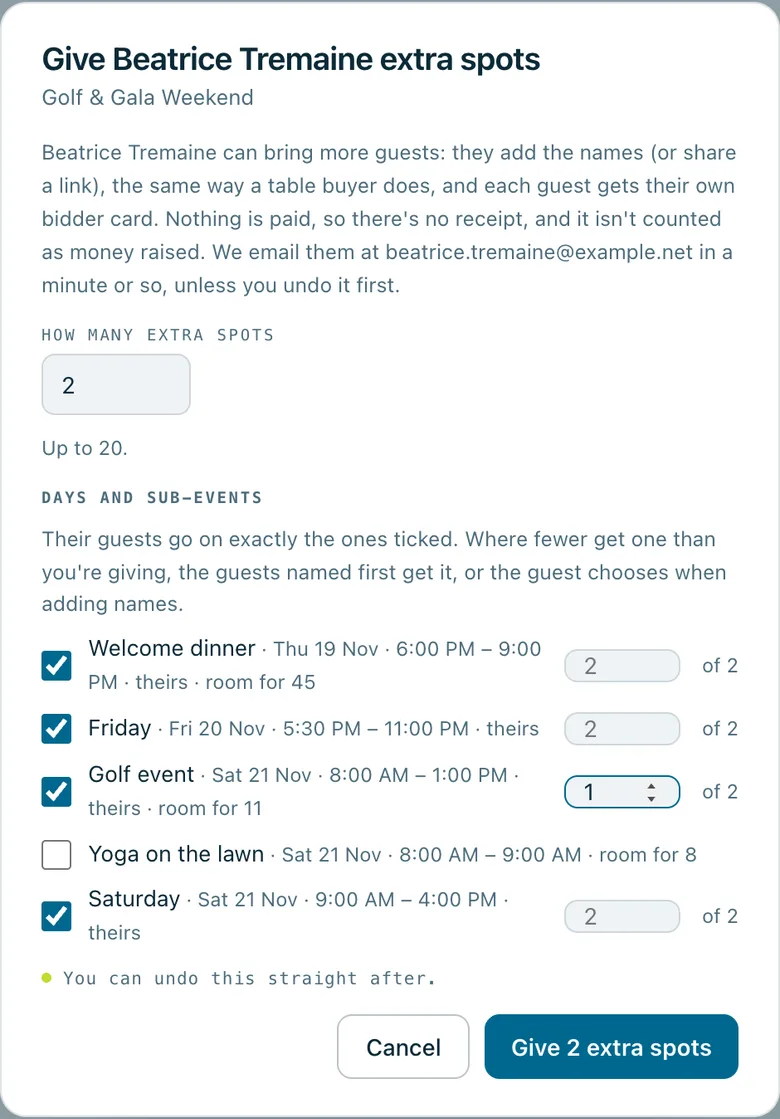
Give Beatrice Tremaine extra spots: 2 extra spots, her own days and sub-events ticked to start with, the golf event for 1 of the 2, and the room left in each.
Real screenshots of Paddlit, taken with a made-up organisation, Maple & Main Children's Fund.
Extra spots
From the guest list or a guest's card, managers and owners choose how many extra spots to give, from 1 to 20. The guest adds the names on their own page, or shares a link so each of their guests adds their own. Each guest they name goes on the guest list with their own bidder card.
Free, and never counted as money. Nothing is paid and there's no receipt. Extra spots are never counted as tickets sold or as money raised.
The right days. With days and sub-events, the extra guests get the guest's own to start with. Staff can tick others, untick some, or give one to fewer of them, like golf for 1 of 2.
Limits still hold. The dialog shows the room left in each day and sub-event. Extra spots count toward those limits, and your plan's guests per event, before the names come in.
Told a minute later. The guest gets an email, and a text if they agreed to texts, a minute or so later, so an Undo straight after stops it. With no email or texts, staff get the two links to share, each with a Copy button.
For new guests only. The places can't be used for the guest themselves, or for someone already on the guest list.
Undo takes them back while nobody has been named on them. After that, they're taken back from the order in Tickets & sponsors, and anyone named on them comes off the list.
Passing a place on
When a guest can't come, managers and owners use Pass their place on… on the guest list or the guest card. They find someone the organisation already knows, or add someone new with their name and, if they have them, an email address and a mobile number.
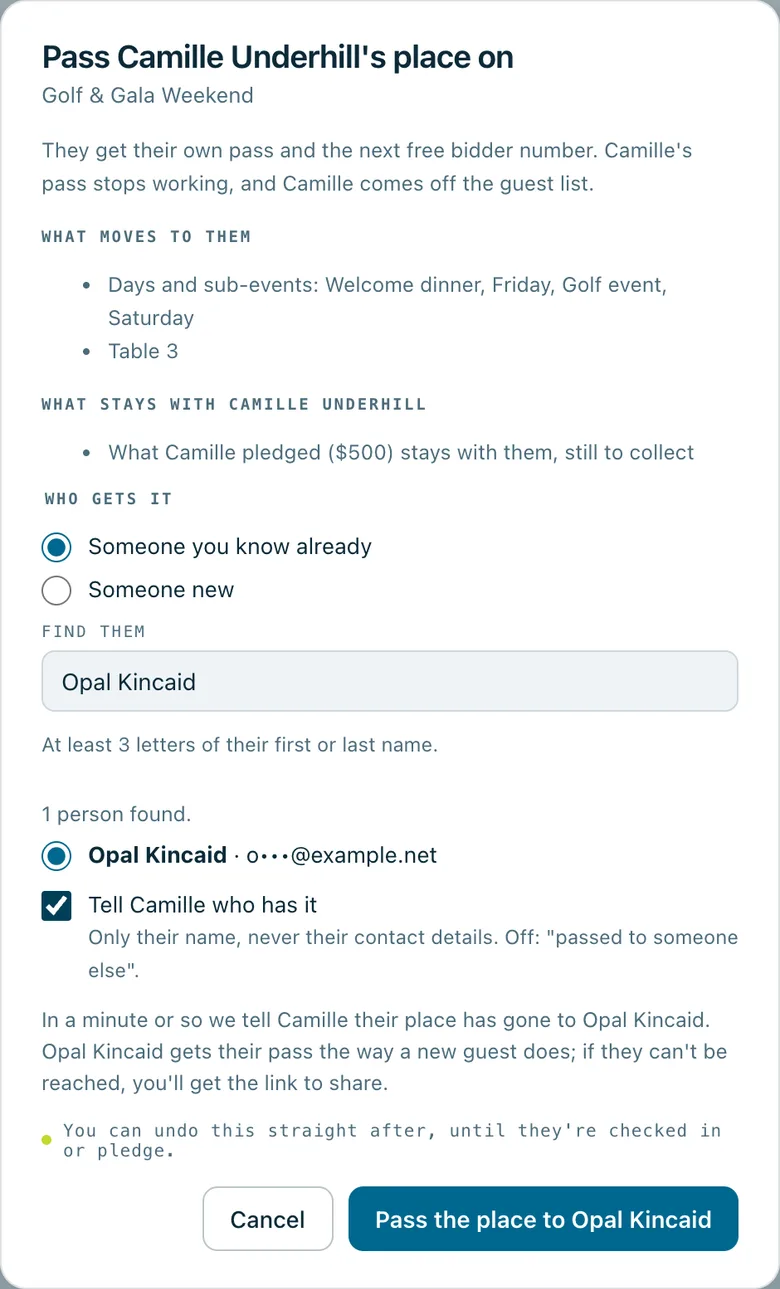
Before anything happens, the dialog says what moves and what stays:
What moves: their days and sub-events and their table, and their seat on a ticket or package.
What's new: the new guest gets their own pass and the next free bidder number. The first guest's pass stops working, and they come off the guest list.
What stays: what the first guest pledged stays with them, still to collect, and so does their card on file. So does any order they bought or were given.
Managers can find people who have been guests at your organisation's events; owners can find anyone your organisation knows. A search needs a whole email address or at least three letters of a name, and shows only a hint of each email address.
A guest who has already been checked in can't have their place passed on: they're here.
Who's told
Both people hear about it a minute or so later, so an Undo straight after stops the messages. The first guest is told their place has been passed to someone else. They're told the new guest's name only if staff tick the box to tell them who has it, and never their contact details.
The new guest gets their pass the way any new guest does. When they can't be reached, staff get the link to share.
Undo puts everything back, until the new guest is checked in or pledges.
Who can do it
Managers and owners. Door volunteers and pledge collectors can't give extra spots or pass a place on.
Pass Camille Underhill's place on: what moves to the new guest (her days and sub-events and Table 3), what stays with her (her $500 pledge, still to collect), someone already known chosen, and Tell Camille who has it ticked.
In practice
How it plays out
“Can I bring two friends?”
A week before the event, a guest asks if two friends can come with them.
The event manager gives them 2 extra spots, with all of the guest's own days for both and golf for one.
The guest gets an email with a link to add the names. Each friend they name goes on the guest list with their own bidder card.
A guest can't make it
Two days out, a guest says they can't come, and a friend who came last year will go instead.
The manager taps Pass their place on…, finds the friend, and sees what moves to them and what stays.
The friend gets their own pass and bidder number, with the same days and table. Anything the first guest pledged stays with them, still to collect.
See your next fundraising night on Paddlit
Sign-ups open soon. Book a demo and we'll show you around.